StackChan: driving a little desk robot from Claude
🇫🇷 Lire cet article en français
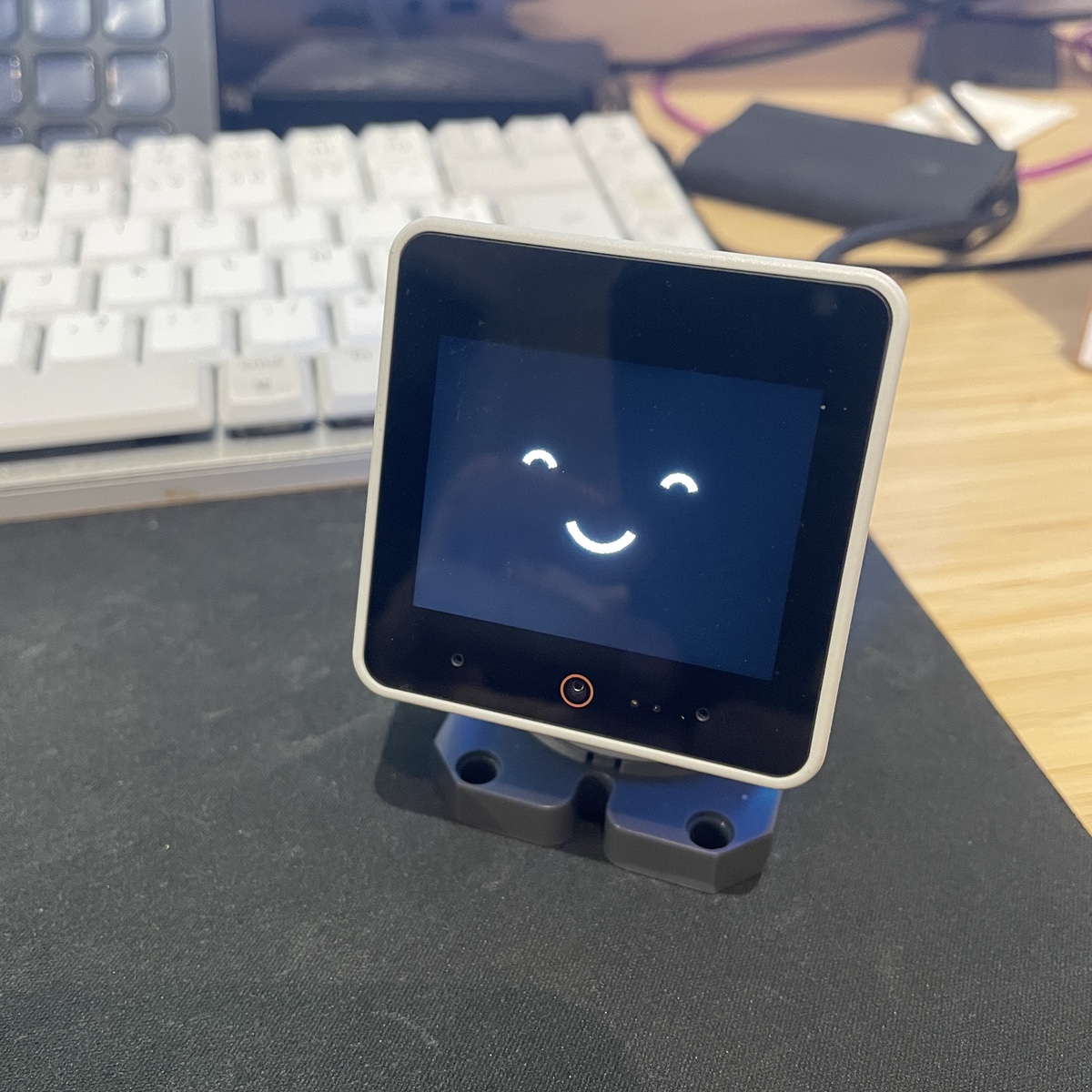
It has been sitting on my desk for a while: a StackChan, the little robot from M5Stack. A square head that is actually a screen, two motors to turn and tilt the head, LEDs, a touch sensor on top. And a face. Of course, you want to talk to it 🥰
The robot ships with an official firmware that already turns it into a voice assistant. But I had another idea: let Claude drive it. While I work with an agent, the robot could turn its head, change its expression, react when I touch it. In short, give a body, even a tiny one, to a conversation.
Let's go through it together, with everything I had to build: a custom firmware, a shared MCP server, and a few traps along the way.
The hardware
Under the hood, the StackChan is:
- a removable M5Stack CoreS3, with an ESP32-S3 (dual core at 240 MHz, 16 MB of flash, 8 MB of PSRAM), the 320 × 240 screen, a speaker, microphones, a camera;
- a motorized body with two Feetech SCS0009 servos: one for rotation (left-right), one for tilt (up-down);
- 12 RGB LEDs, a three-zone touch sensor on top of the head, NFC and infrared.
The servos have an interesting feature: they are not classic hobby servos driven by PWM. They sit on a serial bus at 1 Mbaud, and you can ask them for their position. A bit like the Dynamixel XL-320 in my Darwin Mini. Very handy to know where the head really is.
Choosing the tooling
I went with Arduino and PlatformIO, and the official M5StackChan library, which provides everything needed for the servos, the LEDs or the touch sensor.
First small hurdle: PlatformIO's official espressif32 platform was too old for this library, which needs a recent Arduino core. The fix: pioarduino, a community-maintained platform that brings Arduino core 3.3.13. One line in platformio.ini:
platform = https://github.com/pioarduino/platform-espressif32/releases/download/55.03.313/platform-espressif32.zip
Validate before building
Before writing a single feature, I checked every component one by one: the screen, the LEDs, the touch sensor, the speaker, the battery reading, and above all the servos.
For the servos, three things to set up:
- Zero calibration. You turn the motors off, place the head by hand (screen straight, facing you), and save that position as the origin. It is stored in the ESP32's non-volatile memory.
- Safety bounds. M5Stack recommends keeping the tilt between 5° and 85°: beyond that, the servo may strain, or even break. So the firmware clamps every command, and says so in its response when a value was brought back within bounds.
- Axis directions. A positive rotation goes to the left… the robot's left. It sounds obvious, but it's the kind of detail you'd better check on the real hardware rather than guess. And yes, I had to hold the StackChan in my hands to convince myself it was turning to the right left 😇
A custom firmware
The official firmware is a full voice assistant. I replaced it with a much simpler firmware, whose only job is to obey commands. (Don't worry: the M5Burner tool can restore the original firmware.)
A JSON protocol, one line per message
The Mac and the robot talk over USB, with a very simple protocol: one JSON object per line. A request:
{"id": 12, "cmd": "move", "yaw": 20, "pitch": 30, "speed": 400}
And its response, carrying the same id:
{"id": 12, "ok": true, "yaw": 20, "pitch": 30, "clamped": false}
The robot also sends events on its own: when it boots, when someone touches its head (click, forward or backward swipe), or when a gesture is done.
The commands cover the whole robot: move the head, go back to the rest position, stop, play a gesture, change the expression, show a speech bubble, light the LEDs, beep, read the status. The protocol is described in a separate document, which acts as the contract between the firmware and the server.
An animated face
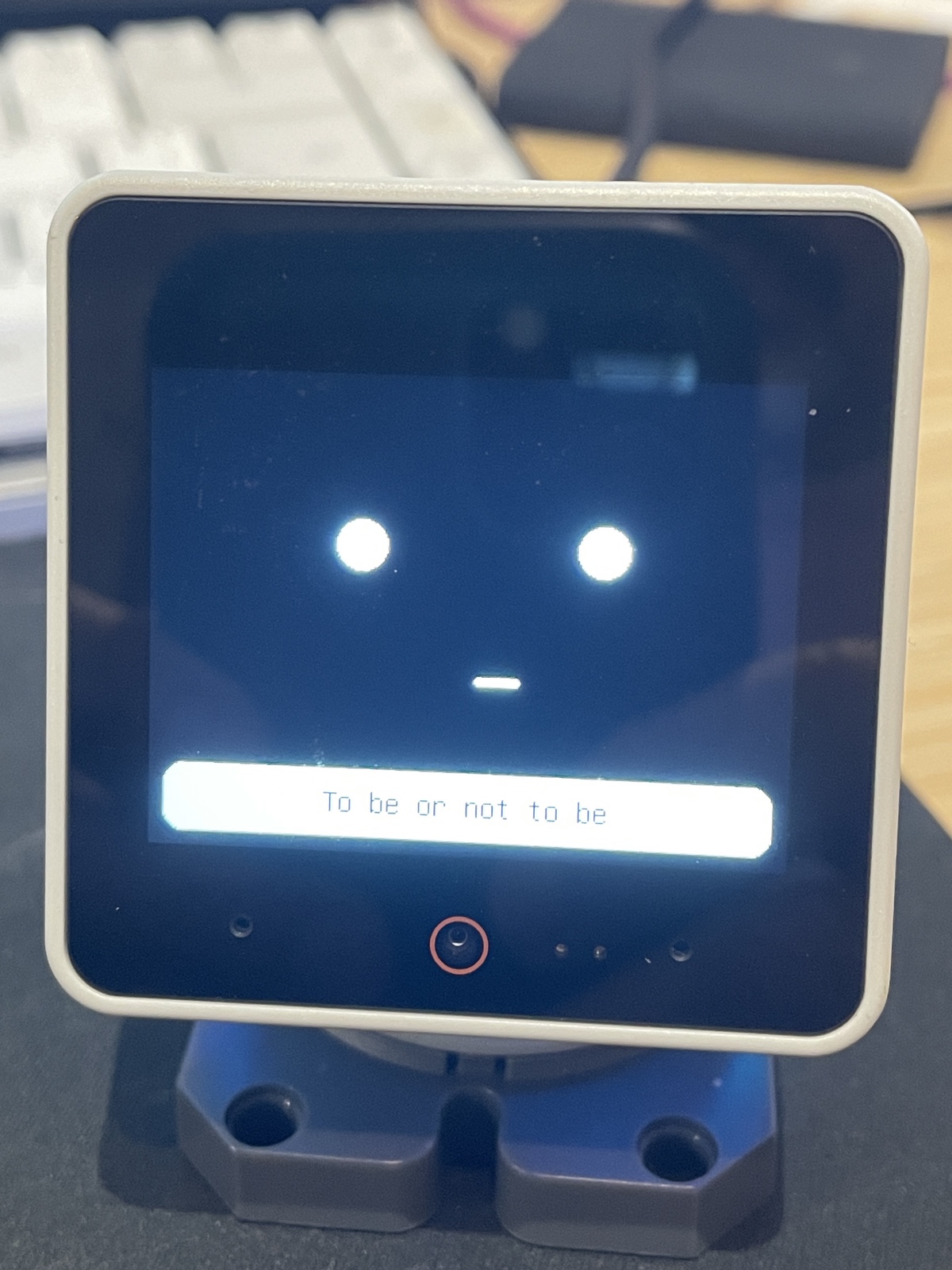
The face is drawn into a sprite, an in-memory image the size of the screen, stored in PSRAM. Everything is drawn into it, then sent to the screen in one go: no flicker. It has seven expressions (neutral, happy, sad, surprised, sleepy, angry, thinking), and can show a speech bubble under the face.
Gestures that don't block
Nodding, shaking the head, looking around, wiggling, looking up… Each gesture is a sequence of steps. Instead of waiting for each move to finish (and blocking everything else), the firmware moves one step forward on each loop iteration, once the planned time has elapsed. During a gesture, the robot keeps reading commands, animating the face and watching the touch sensor. And at the end, it says so with a gesture_done event.
An MCP server… then a shared MCP server
For Claude to drive the robot, it needs tools. That's exactly what an MCP (Model Context Protocol) server does: it exposes tools, such as move_head, set_face or say, and turns each call into a JSON command for the robot. I wrote it in Python. If you want to know more about MCP, I recommend Philippe Charrière's excellent article.
The first version was the most classic one: a stdio server, started by each Claude session. And then, trouble. I open a second Claude Code session, it starts its own copy of the server… which can't open the USB port, already taken by the first one. Only one process can hold the serial port.
Hence a new architecture: a single server, started once, which keeps the USB port, and that every Claude session joins over local HTTP. To be honest, I don't think I'll really need many sessions at once. But I plan to add Wi-Fi support later on, and that will be HTTP anyway.
Claude session 1 ─┐
Claude session 2 ─┼─ HTTP 127.0.0.1:8765/mcp ──> stackchan-mcp ──USB serial──> robot
Claude session N ─┘
On the Claude Code side, you register it once, for all sessions:
claude mcp add --transport http --scope user stackchan http://127.0.0.1:8765/mcp
But several sessions driving the same robot can quickly turn into a fight: one wants to look left, the other right. So the server manages control:
- the session that sends a command to the robot takes control, as long as it sends at least one command every 10 seconds;
- meanwhile, other sessions are refused right away, with a message saying when to retry;
- some tools stay free for everyone: reading the status, checking the touch sensor, and above all
stop, the emergency stop.
And the touch sensor? Every session receives every event. The server keeps a cursor per session: get_touch_events returns what happened since this session's previous call.
One last practical detail: a flash_firmware tool builds and flashes the firmware. It releases the USB port, runs PlatformIO, then reconnects. So Claude can change the firmware and test it without me touching a cable.
The server only listens on the local address (127.0.0.1): it can't be reached from the network.
The traps
A hardware project without surprises doesn't exist. Here are mine.
Opening the serial port reboots the robot. On macOS, with the ESP32-S3's native USB, just opening the port reboots the chip. The face, the LEDs and the bubble go back to their initial state. The workaround: wait for the boot event before sending anything, and keep in mind that every reconnection resets the robot.
The servo says it's still moving. The servos' moving flag can stay true while the head is perfectly still. So, to know whether a move is over, the server doesn't trust that flag: it checks that the position has stopped changing.
The chip that stopped answering. Once, the robot stopped answering entirely, even to the flashing tools, while the USB port was still listed. No command helped. The only fix: unplug and replug the cable. It happens, you just need to know.
What about Claude Desktop?
Claude Code is great for working. But for chatting, I wanted to use Claude Desktop.
Claude Desktop starts local MCP servers over stdio. But to avoid USB conflicts, I had to go back to HTTP. I hadn't gone through all that trouble for nothing, come on! 😜
The solution: mcp-remote, a small bridge between stdio and HTTP. Claude Desktop starts it, and it relays everything to the shared server. Claude Desktop becomes one more session, subject to the same control rules as the others.
{
  "mcpServers": {
    "stackchan": {
      "command": "/absolute/path/to/npx",
      "args": ["-y", "mcp-remote", "http://127.0.0.1:8765/mcp"],
      "env": { "PATH": "/absolute/path/to/node/bin:/usr/bin:/bin" }
    }
  }
}
The trap of this step: paths. Claude Desktop doesn't inherit your terminal's PATH. If Node is installed with nvm (or fnm, or Homebrew), npx simply isn't found. So you need to give the full path to npx, and add the folder that holds node to the PATH, since npx needs it to run.
An important note about this step: it was late, I wanted it to work, so I picked the first solution that seemed acceptable. There may well be much better ways to use a local MCP server. Feel free to reach out, I'd love to hear from people who know better.
A robot that feels the conversation
And now, my favorite part: making the robot react to the emotions of the conversation.
For that, I added a tool: express_emotion. You give it an emotion (joy, surprise, curiosity, sadness, anger, tiredness… thirteen in all) and an intensity, and in a single call it sets:
- the face;
- the LED color, with a brightness that follows the intensity;
- the head position (head down when sad, head up when surprised);
- and, when the intensity is high enough, a gesture and possibly a beep.
Two important choices in this tool. It returns right away: the head moves in the background, the conversation doesn't wait. And it never returns an error. If the robot is unplugged, or controlled by another session, the tool simply answers shown=false, with the reason. A missed emotion doesn't matter at all; a conversation interrupted by an error does.
But who picks the emotion? Claude itself. In Claude Desktop, I created a Project with custom instructions that ask, at the start of every reply, to call express_emotion with the dominant emotion of the exchange, without mentioning the robot in the reply. No extra model, no sentiment analysis: the model reading the conversation is the best placed to sense its tone.
One limit, though: in the Chat tab of Claude Desktop, nothing forces the tool call. Everything relies on Claude following the project instructions. It does most of the time, not always.
But look at the next section, I have other plans.
What's next?
A few rather technical ideas for what comes next:
- An authentication token on the HTTP API. For now, the only protection is listening on the local address: any program running on my Mac can drive the robot.
- A Wi-Fi connection between the server and the robot, to get rid of the USB cable.
But my real goal, just like my experiments with my Reachy Mini robot, is to have an autonomous agent, like my Hermes Agent, able to express an emotion, a state, through a physical device. To be continued.
The code (firmware, MCP server and documentation) is on StackChan-pilot.
Tell me what you think, drop me a line on social networks 💞