Eclipse Enclave: let your coding agents run wild, in a box

If you follow my agent harness series, you've read this sentence more than once: the real defense is isolation. Allowlists have holes, approvals get clicked too fast, and a model that can run a shell can do anything your user can do. I kept telling you to work in a throwaway directory. That's a bit… artisanal 😅
So when I came across Eclipse Enclave, I had to take a look. Its tagline says it all: "Open-source sandbox for AI coding agents". The goal: give the agent full autonomy, without giving it your machine.
The problem it solves
We all want our agents to work on their own. That's the whole point: no Allow? [y]es / [n]o every ten seconds, no babysitting. But as the site puts it, "The freedom that makes agents useful makes them dangerous." An agent running unrestricted on your host can delete the wrong files, leak secrets, get hijacked by a prompt injection hidden in a README, or step on the toes of another agent running in parallel.
The usual answer is the one I gave in my articles: approvals and allowlists, in the harness. Enclave takes the other road. Let the agent do whatever it wants ("YOLO mode", in the README's own words), but inside a box you control.
How it works: see, run, reach, keep
Enclave runs the agent in a container, one per session, on Docker or Podman. And it controls four things:
- See: the agent only sees the project's worktree, plus the extra directories you choose to mount. Not your home directory: Enclave even refuses to mount it, or other sensitive paths, and refuses to run as root.
- Run: each session gets its own ephemeral container, with its own filesystem, process tree and network stack. No confirmation prompts inside: the box is the guardrail.
- Reach: all outbound traffic goes through a gateway, a sidecar that filters DNS and proxies connections. Only allowlisted domains get through, and both allowed and blocked connections are logged.
- Keep: your logins, configuration, history and the agent's memory persist on the host, so you don't have to log in again at every session.
The "reach" part deserves a second look, because it answers a limit I listed in article 05 of my series: a shell agent inherits your environment, API keys included. With Enclave, secrets handled by the gateway reach the agent "only as placeholders". The gateway inserts the real value on the way out. The agent can use the key, it can't read it.
And for parallel work, Enclave relies on plain git: each agent can get its own worktree, so two sessions never edit the same files.
Which agents?
The usual suspects. The README lists six built-in tools: Claude Code, Codex, Copilot, OpenCode, Pi, and the Theia IDE, which can be attached to a session. Others, like Amp, can be added from the enclave-extensions repository.
Getting started
I'm on a Mac, so that's the path I'll describe. Enclave also runs on Linux, and on Windows through WSL2: the getting started page has all the variants.
You need a container engine (Docker, or Podman), and Git 2.26 or newer with your author identity configured: Enclave refuses to start without it.
On macOS, there's no package: you download the binary for your architecture from the latest release, enclave-darwin-arm64 for Apple Silicon or enclave-darwin-amd64 for Intel, along with checksums.txt. Then:
shasum -a 256 --check --ignore-missing checksums.txt
xattr -d com.apple.quarantine ./enclave-darwin-arm64 2>/dev/null || true
install -d ~/.local/bin
install enclave-darwin-arm64 ~/.local/bin/enclave
The xattr line is there because the macOS binaries are "unsigned and not notarized": without it, Gatekeeper refuses to run the binary. And macOS doesn't put ~/.local/bin on your PATH by default, so add this to your ~/.zshrc:
export PATH="$HOME/.local/bin:$PATH"
Later on, enclave self-update keeps the binary up to date.
Then, from inside a git repository:
cd my-project
enclave
That's it. The first run asks which agent you want and saves your choice. You log in from inside the agent once, and Enclave keeps it for the next sessions.
A few commands worth knowing:
enclave --tool claude      # pick another agent for this session
enclave continue          # resume the last session
enclave --background      # start a session without attaching to it
enclave ps                # list the sessions
enclave attach <name>     # attach to a running session
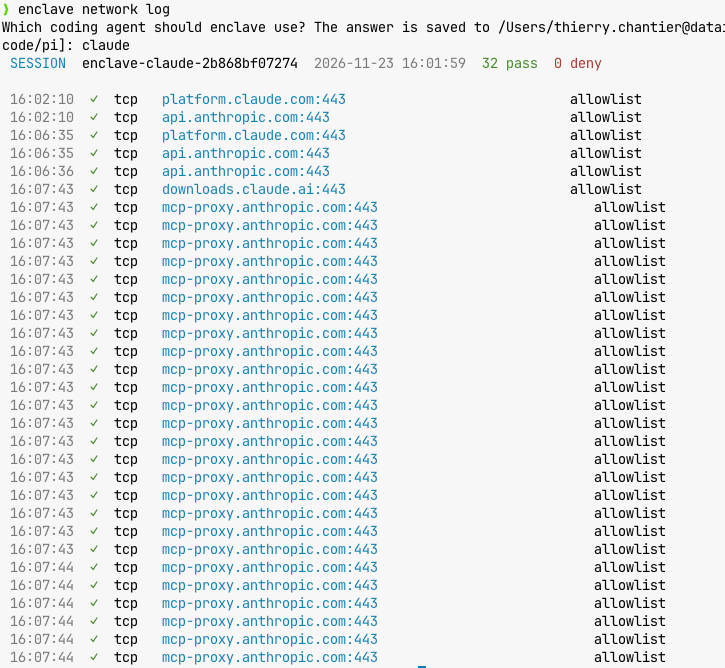
enclave network log       # what the agent tried to reach, allowed or blocked
enclave network log is the one I like most. It's exactly the "no magic" spirit of my series: you see what your agent actually did on the network. With --verdict deny you only get the blocked attempts, which can be very instructive 👀
And for parallel agents, plain git:
git worktree add ../myproject-agent -b agent/experiment
cd ../myproject-agent
enclave
Configuration is optional: Enclave works with no config file at all. When you need one, there's a global JSON file and a per-project one, for things like the default agent, extra read-only directories or additional features.
HomeShell, the graphical companion
Running several agents in several terminals quickly gets messy. Which one is waiting for me? Which one is done? That's the goal of HomeShell, described as "a lightweight control plane for AI-assisted development": one web UI or desktop window to start, watch and answer all your agent sessions, across your projects, whether they run locally or in an Enclave container.
It's still a preview, and much too early to really talk about it. I'll keep an eye on it 👀
Still young
Let's be honest, as usual: this is a young project. The docs say "The docs are still being filled in" and "The CLI is still evolving". HomeShell is labelled as a preview, with builds following every change. The QEMU microVM backend is experimental, and for now runs without network restrictions. Expect rough edges, and expect things to move fast.
But the approach is the right one, I think. Harness guardrails reduce the risk, a box contains it. And both are open source, under the MIT license, at the Eclipse Foundation, which also means a governance you can look at.
That said, Enclave isn't alone on this ground. Docker has its own answer for running agents in a sandbox, with sbx. Same idea, different trade-offs, and the comparison deserves more than a paragraph. That will be for another article.
Links:
- Site and docs: enclave.eclipse.dev
- Enclave: github.com/eclipse-enclave/enclave
- HomeShell: github.com/eclipse-enclave/homeshell
- Eclipse project page: projects.eclipse.org/projects/ecd.enclave
I'll give it a real try with my own harness soon. Tell me what you think 💞