Build your own agent harness, part 7: how do you approve a change you can't see?

Last time, our harness became the security boundary: read-only commands run freely, everything else waits for your approval. And we ended on a frustration. Ask the agent to add a comment to a file, and you get something like this to approve:
sed -i '1i // ...' Agent.java
Can you tell what the file will look like afterwards? With a one-liner, maybe. With a real edit in the middle of a file, a regular expression and a few escaped characters… no way. You approve blindly, or you refuse everything 😵
Today we fix that. Not with a smarter parser, but with two new tools: write_file and edit_file.
Wait, didn't we just remove specific tools?
Yes. In article 05, one bash tool replaced list_files and read_file, and I was very happy about it. So adding two specific tools back looks like a step backwards.
It isn't, and the reason is the whole point of this article: dedicated tools exist so they can be controlled. A bash call is a string: the harness can only guess what it does. A write_file call is a path and a content: the harness knows exactly what it will do, and can show it to you before it happens.
Look at the agents you use every day: they all have a shell, and they all have a dedicated edit tool. Now you know why. Bash stays for everything else. Just keep in mind that dedicated tools means better control.
Two new tools in the registry
Here is the registry of Agent.java now:
// bash for everything... except writing files, where dedicated tools are more reliable and reviewable.
final Map<String, Tool> TOOLS = Map.of(
        "bash", tool("bash", "Runs a bash command in the current directory and returns its output",
                args -> bash(args.path("command").asText()), "command"),
        "write_file", tool("write_file", "Creates or overwrites a file with the given content",
                args -> writeFile(args.path("path").asText(), args.path("content").asText()), "path", "content"),
        "edit_file", tool("edit_file", "Replaces old_text by new_text in a file. old_text must appear exactly once",
                args -> editFile(args.path("path").asText(), args.path("old_text").asText(), args.path("new_text").asText()),
                "path", "old_text", "new_text"));
Three tools. write_file creates or overwrites a whole file. edit_file replaces a piece of text in a file. And look at the description of edit_file: "old_text must appear exactly once". Remember article 03: that description is all the model knows about the tool. The rule is written for it.
Tools with several parameters
Until now, our tool() helper only supported tools with a single string parameter (article 04 listed it as a limit). edit_file needs three. So ToolFunction now receives the parsed JSON arguments, and each tool picks what it needs:
interface ToolFunction {
    String run(JsonNode arguments) throws Exception;
}
And the helper declares any number of required string parameters:
// Builds a tool whose parameters are all required strings.
Tool tool(String name, String description, ToolFunction function, String... parameters) {
    var schema = JsonObjectSchema.builder();
    for (String parameter : parameters) schema.addStringProperty(parameter);
    var spec = ToolSpecification.builder()
            .name(name).description(description)
            .parameters(schema.required(parameters).build())
            .build();
    return new Tool(spec, function);
}
Same idea as before, a loop instead of a single property. Nothing more.
The permission follows the tool
Now the key line of this article. Our isReadOnly() from article 06 receives the tool name, and starts with this:
boolean isReadOnly(String toolName, JsonNode arguments) {
    if (!toolName.equals("bash")) return false; // writing files always needs approval
    // ... the bash allowlist of article 06, unchanged ...
That's it. Any tool other than bash needs approval. Read-only shell commands still run freely, and every file change asks.
Notice the difference with article 06. There, we parsed a string to guess whether a command could change something, with all the holes we listed. Here, there's nothing to guess: write_file writes, by definition. The permission follows the tool, not a parsed string.
execute() changes a little too: it parses the arguments once, and passes them both to isReadOnly() and to the tool.
Informed approval
So the harness asks. But this time, what does it show you?
For an edit_file, a diff: the old text in red, the new text in green, before anything is written. You see exactly what changes, and nothing else.
For a write_file, the harness tells you whether it's a new file (new file NOTES.md (12 lines)) or an overwrite (overwrites README.md (85 lines → 40 lines), highlighted in yellow), followed by the first lines of the new content. Before saying y, you know the whole file is about to be replaced.
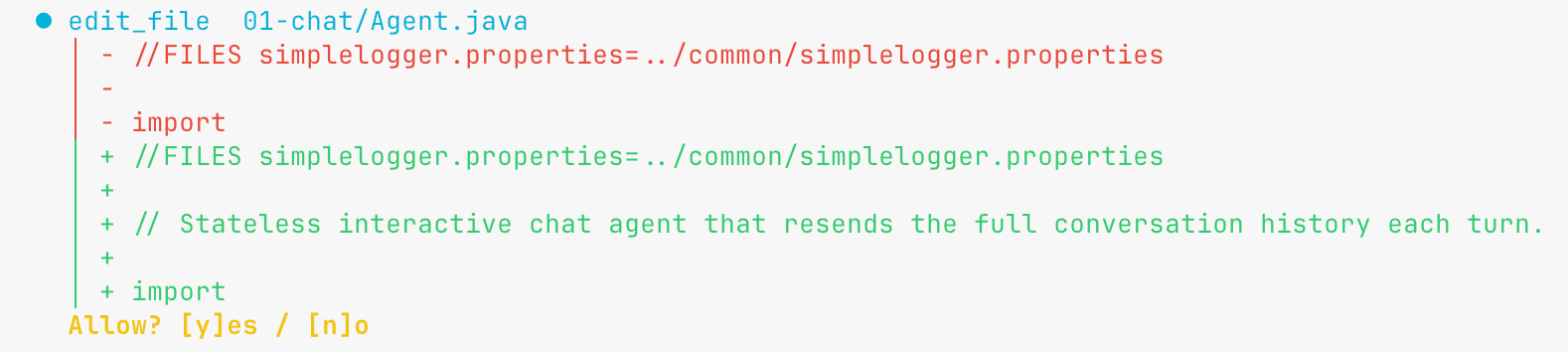
All this rendering lives in the display code (common/TuiDisplay.java), not in the harness. The harness only has to provide one thing: a tool call whose arguments say what will change. That's exactly what sed -i couldn't give us.
Designing a tool for a model
Now let's look at the edit tool itself:
// Exact text, no regex, and it must be unique: the edit lands exactly where the model meant it.
String editFile(String path, String oldText, String newText) throws IOException {
    String content = Files.readString(Path.of(path));
    int first = content.indexOf(oldText);
    if (first < 0) return "Error: old_text not found in " + path + ". Read the file again and copy the text exactly.";
    if (content.indexOf(oldText, first + 1) >= 0) return "Error: old_text appears several times in " + path + ". Include more surrounding lines.";
    Files.writeString(Path.of(path), content.substring(0, first) + newText + content.substring(first + oldText.length()));
    return "Edited " + path;
}
Two design choices, both made for a model:
- Exact text, no regular expression. A regex is a second language to get right, with escaping traps everywhere. Exact text is what the model just read in the file: it copies it, it's done.
- The text must appear exactly once. If
return null;appears five times in a file, which one did the model mean? We don't guess. We refuse, and the edit lands only where the model meant it.
And look at the error messages. Not "invalid argument", not an exception: "Read the file again and copy the text exactly". "Include more surrounding lines". They don't only say what went wrong, they say what to do next. Who reads them? The model, as a tool result (yes, article 04 again: errors are results). So these sentences are instructions, sent exactly when they are needed.
A tool's error message is a prompt. Write it for the model.
writeFile(), for its part, is plain Java: create the parent directories, write the file, report the number of lines.
Instructions, again, are not guardrails
The system prompt gets a new line:
To change files, use write_file and edit_file, never sed or shell redirections. Be concise.
And what if the model ignores it, and uses sed anyway? Then sed goes through the bash allowlist of article 06, isn't read-only, and asks for approval like before. Without a diff, but it asks. Safety doesn't depend on the model's obedience. The instruction only makes the comfortable path the likely one.
Run it
Still from a throwaway directory, still in a real terminal:
cp -R /path/to/some/project /tmp/to-be-trashed-after && cd /tmp/to-be-trashed-after
export LLM_API_KEY=...
jbang /path/to/build-your-harness/07-file-tools/Agent.java --inspect
Try it
The cliffhanger of article 06 first:
Add a header comment summarizing the file to Agent.java.
(or any file of your throwaway project). This time you get an edit_file call, and the red / green diff shows up before anything is written. y, and the file is changed. If you want the contrast, run the same prompt with step 06: a sed -i to approve blind. Same request, two very different approvals.
Now let's trap the edit tool. Pick a word that appears several times in a file:
In Agent.java, replace "history" by "messages".
The model's first edit_file will probably use a short old_text, and get "appears several times… Include more surrounding lines". Then it retries with a longer, unique fragment, or edits each occurrence one by one. Nobody told it how, except our error message. It did its job as a prompt.
A new file:
Create a NOTES.md listing the files of this project.
The approval says new file NOTES.md (N lines) and shows the first lines.
And the dangerous one:
Rewrite the README from scratch.
overwrites README.md (X lines → Y lines), in yellow. You know the whole file is replaced before you say y.
Finally, the usual:
Explore this project and summarize it.
Same as in article 06: ls, cat, head keep flowing without a question (and a find may still ask). Reading didn't get any harder.
Two things worth watching while you play: does the model really prefer edit_file over sed? And look at the grey line: an edit sends only the changed fragment, much cheaper than rewriting a whole file through the shell 💸
Limits
- The model can still edit through the shell if it ignores the system prompt. Those commands then ask for approval like any other, but without a diff.
write_filereplaces the whole file. Approving it means trusting its full content, and the preview only shows the beginning.edit_fileneeds an exact match. A whitespace difference, a tab instead of spaces, and it fails. The model has to read the file again and retry: more calls, more tokens.- The allowlist holes of article 06 are still there, and isolation remains the real defense.
As usual, the code, a README to run it and things to try are in the step-07 folder.
Next time
Every file the agent reads, every command output, every edit stays in the history and is resent with every call. The context window is the agent's scarcest resource: what do we keep, and what do we forget?
Tell me what you think 💞